
When to Use Each AWS Database Service
Share This Article
I’ve watched the AWS database console page reshape more architecture meetings than any whiteboard. Somebody opens it, sees a managed service for every data shape, and the diagram starts sprouting cylinders. A cache here, a document store there, a graph database because the data “is basically a graph.” Nobody planned to run six engines. The menu did that.
The reflex behind it sounds like discipline: match each workload to its purpose-built service. Relational rows to RDS, key-value to DynamoDB, search to OpenSearch, hot reads to ElastiCache. That’s how the marketing pages frame it, and it’s how a lot of well-meaning solution diagrams get drawn. What the framing skips is that every engine you add is a second backup story, a second failover behavior, and a second thing that can page you at 2am.
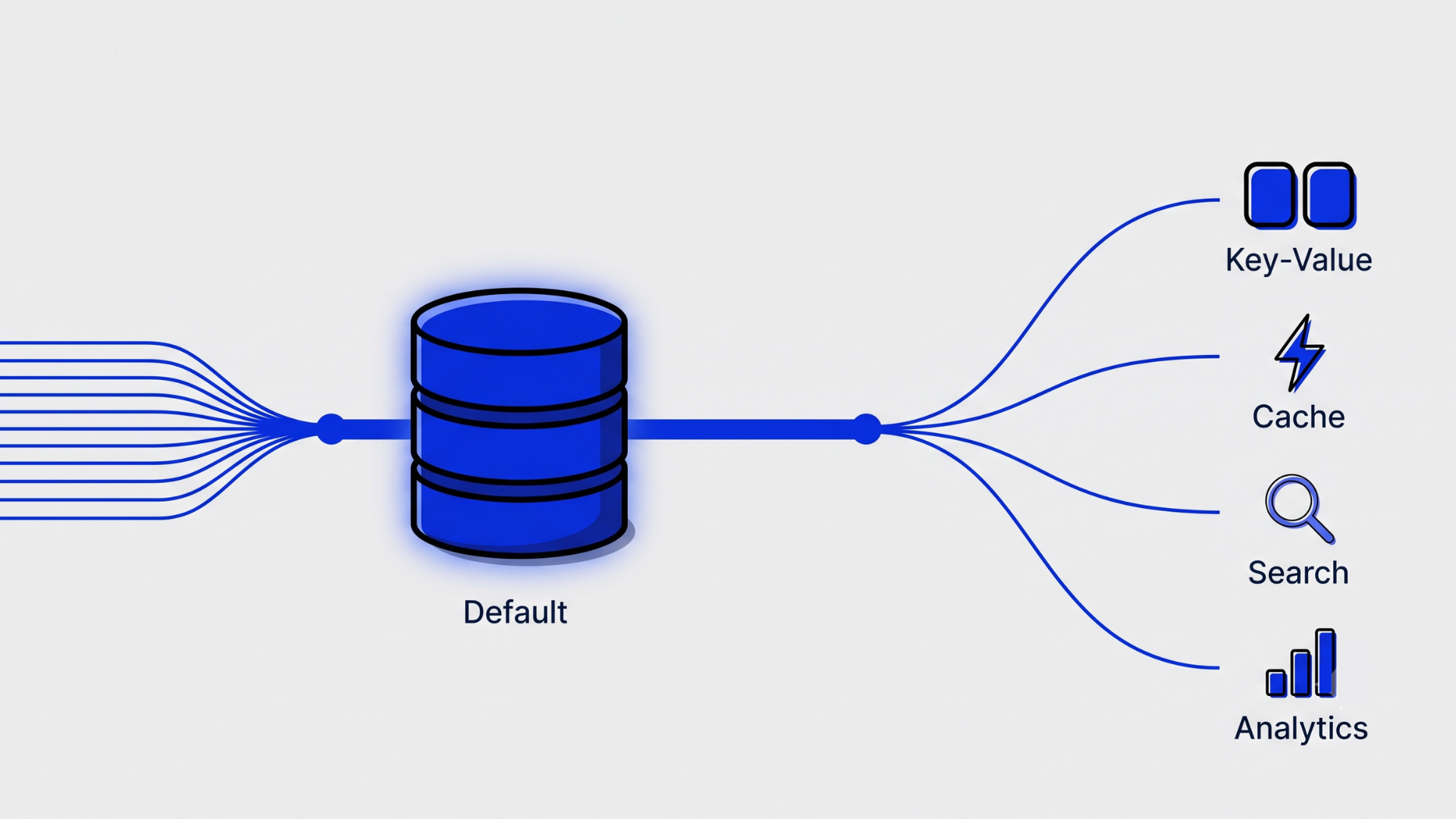
My position, after five posts of building the case, is narrower and more useful. RDS Postgres is the default. Every other AWS database service is an exception you justify with a specific, nameable pressure: a scale you can measure, a latency you can’t hit, an access pattern Postgres genuinely fights you on. This post names those pressures, service by service, and is honest about where the default stops.
Key takeaways
- RDS Postgres is the correct default for most AWS workloads. Specialized services are exceptions you justify with evidence, not options you shop from a menu.
- Every additional database engine adds a full operational surface: backups, IAM, patching, monitoring, failover behavior, and a new 2am failure mode.
- Aurora is a read-scaling and failover decision, not a general performance upgrade. For steady mid-sized workloads, standard RDS is simpler and often cheaper.
- DynamoDB rewards access patterns that are known, stable, and key-shaped. It punishes exploratory queries and products that are still discovering their data model.
- The decision rule: name the pressure before naming the service. If you can’t state what’s failing and by how much, you don’t need the new engine yet.
Should RDS Postgres be your default AWS database?
Yes. For most teams, a single RDS Postgres instance is the correct starting point for nearly every workload on AWS. It handles relational data, JSON documents, full-text search, job queues, and vector similarity well enough that the burden of proof sits on adding a second engine, not on staying with the one you have.
The reflex I’m pushing against is the multi-service diagram: one cylinder per data shape, drawn before a single query has run. It looks rigorous. In practice it front-loads operational cost onto a system that doesn’t have users yet. <!– [PERSONAL EXPERIENCE] Consolidation review where a six-engine startup stack collapsed into one Postgres instance –> I’ve done consolidation reviews where a startup was running six data stores for an application that fit comfortably in one db.r6g.large, and the strongest argument for each extra engine was that it had been easy to add.
What does a second database actually cost? Not the instance price. It costs a second snapshot and restore procedure you have to test, a second set of IAM policies and security groups, a second upgrade calendar, a second monitoring dashboard, and a second failure mode your on-call rotation has to recognize while half asleep. Multiply that by four or five engines and the platform team’s week disappears into care and feeding.
I made the capability case in detail in Postgres does more than you think –>the first post of this series: jsonb for documents, tsvector for search, SKIP LOCKED for queues, pgvector for embeddings. The short version is that Postgres has quietly absorbed most of the jobs the specialized menu is selling.
Where’s the line? The default stops when you need genuine multi-region active-active writes, when sustained write throughput outgrows what vertical scaling and partitioning can absorb, or when your team already operates a specialized engine well and the migration cost points the other way. Those are real pressures. They’re also rarer than the diagrams suggest.
When does Aurora earn its premium over standard RDS?
Aurora earns its price when read scaling, failover speed, or storage elasticity is a problem you can already measure. It is not a general performance upgrade. For a steady, mid-sized workload with one writer and a replica, standard RDS Postgres delivers similar application-visible performance with a simpler and more predictable bill.
The reflex here is “Aurora is just faster Postgres, so why wouldn’t you.” What Aurora actually changes is the storage layer: a shared, distributed volume that supports up to 15 low-lag read replicas, failover that typically completes in seconds rather than a minute or more, and storage that grows without you provisioning it. If those sentences describe problems you have, Aurora is a good answer. If they don’t, you’re paying a premium for headroom you can’t feel.
The billing model deserves more suspicion than it usually gets. On Aurora’s standard configuration you pay per I/O request, which can turn a write-heavy or poorly indexed workload into a bill that moves with traffic in ways nobody forecast. The I/O-Optimized configuration trades that for higher instance and storage pricing, which is easier to predict but only pays off when I/O charges were already dominating. I walked through this class of quiet cost trap in database choices that quietly kill your AWS bill –>the previous post, and Aurora I/O was one of the recurring offenders.
Is failover time actually your constraint? Ask it plainly. If your recovery objective is “a minute of downtime during a failover is annoying but survivable,” standard Multi-AZ RDS covers you. If seconds matter, or your read fleet needs to fan out past a couple of replicas, Aurora is the honest choice.
Where’s the line? Choose Aurora when you can point at a measured need: a read fleet beyond two or three replicas, failover objectives in single-digit seconds, or storage growth you can’t forecast. Stay on standard RDS when one writer and one replica cover the load, because the premium buys you nothing you can observe.
When is DynamoDB actually the right call?
DynamoDB is the right call when your access patterns are known, stable, and key-shaped, and you need consistent low latency at a scale where operating a relational database becomes its own project. Inside that shape of problem it’s superb: no instances to size, no failover to manage, latency that stays flat while traffic multiplies.
The reflex is broader and vaguer: “NoSQL scales, relational doesn’t.” That’s not a data model decision, it’s a slogan. DynamoDB’s scaling comes with a contract most teams don’t read until it hurts. Single-table design asks you to enumerate your queries up front and shape the table around them. Can you write down every query your product will run a year from now? If yes, DynamoDB will reward you. If you’re still discovering the product, every new question becomes a new global secondary index, a backfill, or a migration.
[UNIQUE INSIGHT] The failure mode isn’t scale, it’s the second year of product evolution –> The DynamoDB failure mode I keep seeing isn’t at the scale end. It’s in year two, when product asks a question the table wasn’t shaped for, and the answer involves a scan. Scans read everything and bill you for everything they read. Teams end up exporting to S3 and querying with Athena just to answer questions Postgres would have handled with a WHERE clause.
Where it genuinely fits: session and profile lookups by ID, shopping carts, device state for IoT fleets, idempotency keys, high-scale counters. Access by key, in and out, at volumes where the relational alternative means a DBA-shaped project.
Where’s the line? It runs in both directions. If the access patterns are fixed and the scale is real, DynamoDB deletes a whole class of operational work and is worth the modeling discipline. If the patterns are still moving, the flexibility of SQL is not a legacy habit, it’s the feature you’d be giving up.
Do you need ElastiCache, or can Postgres carry the cache?
Most teams reach for ElastiCache before they’ve measured whether the database is actually the bottleneck. A Postgres instance with sane indexes and a read replica covers much of what day-one Redis deployments end up doing, without introducing a second consistency model your application has to reason about.
The reflex is cache-aside on day one, installed as architecture hygiene rather than as a response to a measurement. But a cache isn’t free correctness. It adds invalidation logic, stale-read windows, cold-start thundering herds, and one more cluster with its own failover story. A well-indexed SQL query is one of the cheapest operations in your stack, a point I put numbers on in the real cost of an LLM call vs a SQL query –>the third post of this series, and caching a query that already returns in two milliseconds buys you complexity, not speed.
There’s also more room inside Postgres than the reflex assumes. An unlogged table gives you a fast, crash-expendable store for hot config or computed state. A materialized view turns an expensive aggregate into a cheap read you refresh on your own schedule.
-- A cache inside Postgres, no new cluster
CREATE UNLOGGED TABLE hot_config (
  key text PRIMARY KEY,
  value jsonb NOT NULL,
  refreshed_at timestamptz NOT NULL DEFAULT now()
);

-- Serve hot reads, refresh on a schedule you control
SELECT value ->> 'feature_flags'
FROM hot_config
WHERE key = 'tenant:4821';
None of this says caches are bad. Redis-shaped problems exist: session stores at serious scale, rate limiting, leaderboards, pub/sub fan-out, sub-millisecond lookups on genuinely hot keys. When you have one of those, ElastiCache (or its multi-AZ sibling MemoryDB, when the cache is also the system of record) is the right tool.
Where’s the line? Add the cache when you can trace measured latency to repeated identical reads the database is serving at volume, or when assembling the cached object is expensive enough that recomputing it per request is the actual cost. A p99 you’ve profiled is a reason. “We might need it” isn’t.
When does OpenSearch beat Postgres full-text search?
OpenSearch wins when search is the product: relevance tuning, faceted navigation, typo tolerance, aggregations over huge document sets, or log analytics at volume. When search is a feature inside your product, Postgres full-text search with tsvector and pg_trgm covers most of the requirement with no new cluster to run.
The reflex is that “real search needs a search engine,” usually decided before anyone has tried the built-in path. I covered what that built-in path can do in Postgres full-text search capabilities –>post one, and I spent why your RAG system is actually a search problem an entire post arguing that even RAG pipelines are search problems first. The same logic applies to the infrastructure choice. If your users type a few words and expect ranked, filtered results over tens or hundreds of thousands of rows, Postgres does that today. If you’re storing embeddings alongside, most teams don’t need a vector database pgvector keeps that in the same engine too.
What OpenSearch brings that Postgres genuinely lacks: BM25-style relevance you can tune per field, analyzers for stemming and synonyms across languages, fast faceting and aggregations as a first-class feature, and an ecosystem built for log and trace analytics. Those matter enormously when search quality is a metric someone owns. They matter very little when search is a box in the corner of your app that needs to be decent.
Does anyone on your team own “relevance” as a number? That’s the honest tell. If nobody’s measuring result quality, you don’t need the engine built for tuning it.
Where’s the line? Move to OpenSearch when relevance tuning becomes a product requirement, when facet-heavy navigation is core UX, or when you’re ingesting log volumes that would drown an OLTP instance. Below that line, the search cluster is an expensive way to avoid learning tsquery.
What about Redshift, DocumentDB, Neptune, and Timestream?
Most of the remaining catalog is genuinely niche. Redshift is the exception teams justify most often and most legitimately. DocumentDB is the one they justify for the wrong reason. The rest deserve a specifically traversal-shaped or time-shaped problem before they enter the diagram at all.
Redshift earns its place when analytical queries scan enough data to degrade your OLTP instance and columnar storage starts winning by orders of magnitude. That’s a real threshold, but it sits further out than most teams assume. Before it, a read replica pointed at your BI tool, plus scheduled rollups, keeps analytics honest without a warehouse. When the dashboards start timing out or the replica lags all day, Redshift (or a lakehouse pattern) is the grown-up answer.
DocumentDB is usually chosen for MongoDB API compatibility, not for capability. If you’re migrating an existing Mongo application, that compatibility has real value. If you’re starting fresh and the argument is “our data is documents,” jsonb in Postgres gives you the document model plus joins, transactions, and one engine to run. Compatibility is a reason. Data shape isn’t.
Neptune is for queries that are traversals at their core: fraud rings, recommendation hops, dependency graphs walked many levels deep. A recursive CTE in Postgres handles shallow traversals fine; when your central query is “friends of friends of friends with filters at each hop,” a graph engine stops being exotic and starts being correct.
Timestream targets high-cardinality metric ingestion, but plain Postgres goes further here than its reputation suggests:
-- Time-series in plain Postgres: range partitions plus a BRIN index
CREATE TABLE metrics (
  device_id   bigint NOT NULL,
  recorded_at timestamptz NOT NULL,
  reading     jsonb NOT NULL
) PARTITION BY RANGE (recorded_at);

CREATE INDEX ON metrics USING brin (recorded_at);

-- Rollups the OLTP instance can afford
SELECT date_trunc('hour', recorded_at) AS bucket,
       avg((reading ->> 'temp_c')::numeric) AS avg_temp
FROM metrics
WHERE recorded_at >= now() - interval '7 days'
GROUP BY bucket;
It’s worth noticing that AWS has already retired some of the catalog’s edge experiments. Betting your architecture on the periphery of the menu carries a risk the center doesn’t have.
Where’s the line? Redshift when analytics measurably degrade OLTP and columnar wins. DocumentDB when Mongo compatibility is the migration requirement. Neptune when the core query is a deep traversal. Timestream when ingest cardinality outruns partitioned Postgres. In each case the service is the answer to a measurement, not to a diagram.
So how do you actually decide?
The pattern across every section above is the same, so let’s make it explicit. Four questions, asked in order, before any new database service enters your architecture.
1. Can you name the pressure? Scale, latency, access pattern, or operational load, stated with a number. “Reads are hot” isn’t a pressure. “This query family runs at 4,000 requests per second and p99 has doubled in a quarter” is.
2. Has Postgres actually failed at the job? Measured on a tuned instance with proper indexes and partitioning, not on defaults. Most “Postgres can’t handle it” stories I’ve audited turn out to be “nobody looked at the query plan.”
3. Do you know the access patterns well enough to commit? This is the DynamoDB question, but it applies everywhere. Specialized engines trade flexibility for their advantage. If the product is still moving, flexibility is worth more than the advantage.
4. Can your team run one more database at 2am? Managed doesn’t mean maintenance-free. Someone still owns the upgrade calendar, the restore drill, the dashboard, and the pager context. If the honest answer is no, the new service costs more than it returns regardless of its technical merits.
Four yes answers and the specialized service has earned its cylinder. Any no, and the default is still the answer, just with better indexes.
One default, a few earned exceptions
The practical rule for AWS database services is short: start on RDS Postgres, and let every other engine argue its way in with a measurement. Aurora argues with failover objectives and read fleets. DynamoDB argues with fixed key-shaped patterns at real scale. ElastiCache argues with a profiled p99. OpenSearch argues with a relevance metric someone owns. Redshift argues with analytics that hurt production.
Get it wrong in the other direction and the failure is quiet. Nothing crashes when you run five engines for a two-engine problem. You just spend the next two years paying for it: five backup drills, five upgrade windows, five monitoring stacks, and a bill that database choices that quietly kill your AWS bill –>climbs in ways nobody owns until finance asks.
So when should you use each AWS database service? When it has earned the job with evidence, and not one cylinder sooner.
Frequently asked questions
What is the best default database on AWS?
RDS Postgres is the best default for most AWS workloads. It handles relational data, JSON documents, full-text search, queues, and vector similarity in one engine, which keeps your operational surface small. Specialized services like DynamoDB or OpenSearch should be adopted as measured exceptions, not starting assumptions.
Is Aurora always better than RDS PostgreSQL?
No. Aurora improves read scaling, failover speed, and storage elasticity, but for steady workloads with one writer and a replica, standard RDS PostgreSQL performs comparably with a simpler bill. Aurora’s per-I/O pricing can also surprise write-heavy workloads. Choose Aurora when you can measure the need it addresses.
When should I use DynamoDB instead of a relational database?
Use DynamoDB when your access patterns are known, stable, and key-based, and you need consistent low latency at high scale with minimal operations. Avoid it when your product is still evolving, because ad hoc queries, analytics, and changing access patterns are expensive and awkward in DynamoDB’s single-table model.
Do I need ElastiCache if I already use RDS?
Usually not at first. Add ElastiCache only after profiling shows repeated identical reads or expensive object assembly dominating latency. Well-indexed queries, read replicas, unlogged tables, and materialized views inside Postgres cover many early caching needs without adding a second cluster, an invalidation strategy, and a new failure mode.
Is Amazon DocumentDB the same as MongoDB?
No. DocumentDB is an AWS-built database that implements a large subset of the MongoDB API, so existing Mongo applications can migrate with limited changes. It isn’t MongoDB’s engine underneath. If you’re building fresh and simply have document-shaped data, jsonb in Postgres usually serves better than adopting DocumentDB.
- April 16, 2026

Naveen Chandra
Hi, I am Naveen Chandra, a Cloud Engineer and Web Developer. I work with companies that take their technology seriously and want a long-term partner, not a short-term contractor. From AWS infrastructure and DevOps automation to full-stack web platforms and React Native apps, I focus on systems that compound in value over years rather than projects that end in weeks.